Microsoft Project 2016 Activation Guide: How to Activate Standard Edition on PC
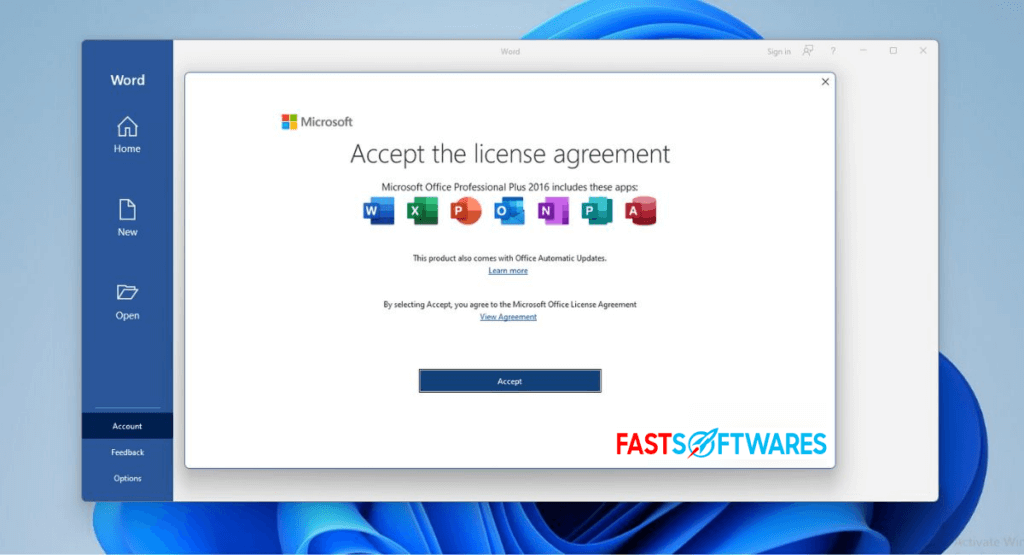
Microsoft Project 2016 activation is essential for unlocking the full potential of the Standard Edition on your Windows PC.
This guide walks students, professionals, and teams through why activating Microsoft Project 2016 is crucial, how to find your activation code, and the simple steps to properly activate your software.
Activating the software not only guarantees legitimate use but also ensures access to all features and official support.
By following this guide, users will understand the activation process clearly and why it matters for productivity and compliance.
Understanding Microsoft Project 2016 Activation
What is Microsoft Project 2016 Activation?
Microsoft Project 2016 activation is the process of verifying your copy of the Standard Edition software with Microsoft’s licensing system.
This verification confirms that your software is genuine and legitimately purchased.
Activation links your software to an authorized product key or activation code.
Without activation, Microsoft Project 2016 will limit functionality and display reminders asking for activation.
Activation also unlocks full access to features, updates, and official technical support.
In essence, activation proves the validity of your software and ensures you can use it without restrictions.
Why You Need to Activate Microsoft Project 2016 Standard
If you do not activate Microsoft Project 2016 Standard, the software will enter a reduced functionality mode after a grace period.
This mode disables saving projects or editing features, making the software practically unusable for real work.
Additionally, unactivated software cannot receive updates or customer support from Microsoft.
Activation safeguards your investment by preventing piracy and software misuse.
It also allows you to benefit from all the tools Project 2016 offers for managing timelines, resources, and budgets effectively.
Hence, activation is necessary to fully utilize Microsoft Project 2016 Standard without interruptions.
Step-by-Step Process to Activate Microsoft Project 2016 Standard on Windows PC
Locating Your Microsoft Project 2016 Activation Code
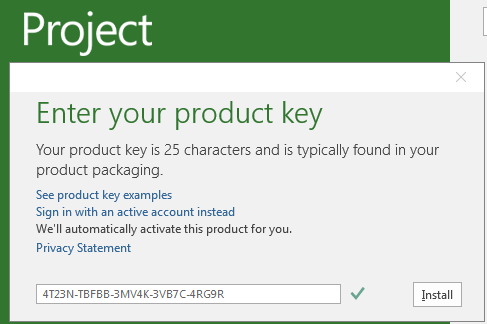
Your Microsoft Project 2016 activation code is a 25-character alphanumeric key usually found in several places.
If you purchased a physical copy, check the product packaging or card inside the box.
For online purchases, the code is often emailed to you or available in your Microsoft account under your digital purchases.
Retailers like Fastsoftwares provide genuine activation codes upon purchase.
Never use codes from unauthorized sources, as they may be invalid or illegal.
Having the correct activation code is the first step to activating your software smoothly and securely.
You can learn more about how to find the product key here.
Using the Microsoft Project 2016 PC Activation Key Download
If you have purchased a digital activation key, you may need to download a small activation utility from a trusted source, such as the official Microsoft website or authorized resellers.
This utility helps enter and validate your activation code on your Windows PC.
Always download activation keys and tools only from reputable sites to avoid malware risks.
After downloading, launch the utility and follow prompts to input your activation code.
The tool then communicates with Microsoft servers to verify your license and activate your copy of Project 2016 Standard.
This process ensures your PC software gains full rights to operate.
Activation Through Microsoft Account and Product Key Entry
- First, open Microsoft Project 2016 on your Windows PC.
- Navigate to the Account or Help section typically found in the File menu.
- Look for the option to activate or change product key.
- Enter your 25-character activation code carefully.
- Next, Microsoft will prompt you to sign in with your Microsoft account if you are not already signed in.
- Signing in links your license to your account, making future activations simpler and enabling license management.
After successful verification, your Microsoft Project 2016 Standard copy will activate fully.
You can now access all features without any restrictions or reminders.
Explore MS Project 2019 here: Microsoft Project 2019 Standard Features for Efficient Project Management
Comparison: Microsoft Project 2016 Activation vs Other Versions and Alternatives
Activation Ease: Project 2016 Standard vs Project 2019 and Project Online
Microsoft Project 2016 Standard uses a one-time product key activation tied to the software installation on your PC.
This traditional activation requires entering a single 25-character key manually or through an activation tool.
By contrast, Project 2019 also follows a similar product key activation but may have updated security methods requiring online verification.
Project Online, however, is subscription-based and activates through user accounts linked to a cloud service rather than a product key.
This subscription model simplifies activation for frequent users but requires ongoing payments.
Project 2016’s activation remains straightforward for users wanting a perpetual license without recurring fees.
Read our article: How to Turn Off the Find My iPhone Feature
Alternative Project Management Tools and Their Activation Processes
Many project management alternatives differ in activation and licensing models from Microsoft Project 2016.
For example, tools like Trello or Asana offer free tiers with optional paid subscriptions activated via accounts without traditional product keys.
Other software like Smartsheet uses cloud-based licenses, requiring only user login credentials for activation.
While these options provide ease and flexibility, they may not offer the deep integration or complex scheduling features found in Microsoft Project 2016.
Understanding these differences helps users decide between traditional licensed software and cloud-based subscriptions or freemium models depending on their activation preferences and project needs.
Conslusion
In conclusion, properly activating Microsoft Project 2016 Standard is vital for accessing the full breadth of features and support the software provides.
The activation process is simple when following the outlined steps: locating your product key, safely using activation tools, and confirming activation through your Microsoft account.
This ensures your investment is protected and your PC software performs reliably.
To start, purchase your genuine activation code from trusted sellers like Fastsoftwares and activate your copy today.
For additional help or to explore newer Microsoft Project tools, support is readily available to guide you.