Explore Windows Server 2019 RDS Multi-Session Features with User CAL License
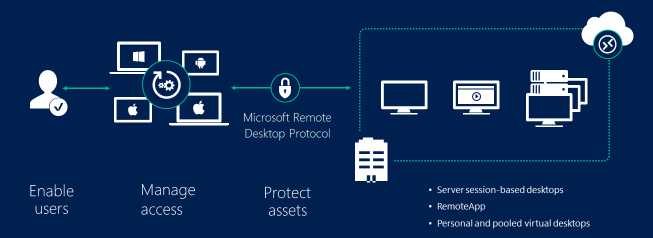
Windows Server 2019 RDS multi-session features provide efficient ways for businesses and IT professionals to manage multiple users accessing remote desktops simultaneously.
These features enable secure, scalable, and high-performance remote desktop services, essential in today’s work environments.
Understanding how these multi-session capabilities work and the importance of having the right licensing, such as the Remote Desktop User CAL license, helps organizations optimize their remote desktop infrastructure.
This knowledge benefits IT administrators who need to ensure compliance while enhancing the remote access experience for users.
By exploring the Windows Server 2019 RDS Multi-Session features, businesses can better deploy Windows Server 2019 remote access solutions to support flexible and productive remote work setups.
Understanding Windows Server 2019 Remote Desktop Services 2019
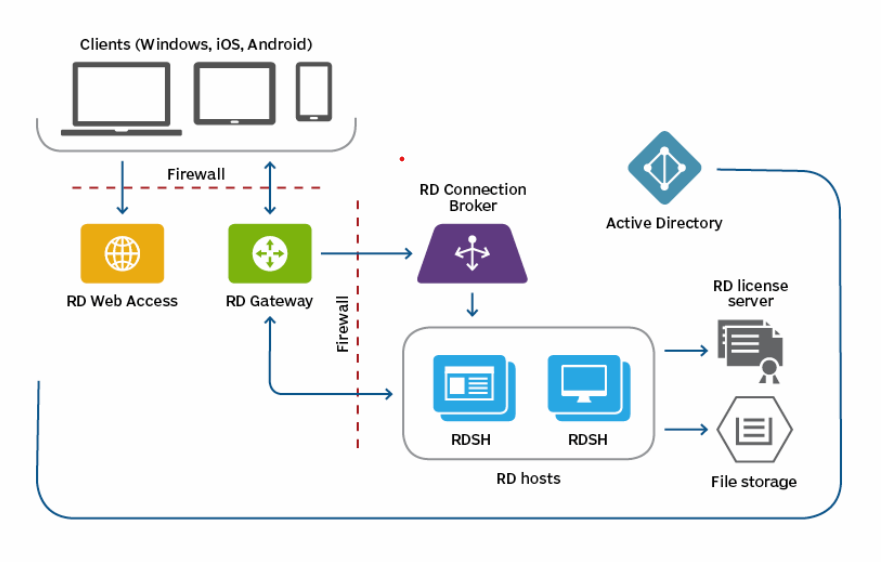
Windows Server 2019 remote access relies heavily on its Remote Desktop Services 2019 (RDS 2019), which enables users to connect securely to applications or full desktops hosted on a server.
Remote Desktop Services 2019 allow centralized management and reduce the need for high-performance client machines by shifting workloads to the server.
This service plays a crucial role when organizations want to offer remote desktop capabilities across offices, home environments, or hybrid cloud setups.
Key Windows Server 2019 RDS Multi-Session Features
Windows Server 2019 RDS multi-session features enable multiple users to share a single server for a full desktop or individual applications (RemoteApp), with improvements like enhanced web client performance, GPU virtualization for graphical applications, and Fair Share CPU Scheduling for equitable resource distribution. Users can access resources via a web portal or client, and administrators can manage shared pools or personal sessions, while also leveraging DDA (Discrete Device Assignment) for high-end graphics-intensive applications.
Key Windows Server 2019 RDS multi-session features
-
RemoteApp and Desktop Collections:Deploy either individual applications (RemoteApp) or full desktop experiences to multiple users simultaneously.
-
Pooled vs. Personal Sessions:Choose between a shared pool of resources, which is more cost-effective, or personal sessions for customized desktop experiences, according to Microsoft.
-
GPU Virtualization:Support for GPUs allows for hardware-accelerated applications, enhancing performance for graphically intensive tasks.
-
Fair Share CPU Scheduling:This feature dynamically distributes CPU time across active sessions, ensuring a consistent user experience and preventing performance issues.
-
RDS Web Client:Provides a single-sign-on (SSO) experience for accessing Remote Desktop Services through a web browser on any device.
-
Efficient Resource Utilization:Multiple users share the same RD Session Host server, which is the most efficient way to utilize resources for a desktop hosting solution.
Benefits of Windows Server 2019 RDS multi-session features
-
Cost-Effectiveness:Reduces the need for individual physical servers and desktops by allowing multiple users to share a single server.
-
Simplified IT Management:Administrators can deploy, manage, and troubleshoot applications and desktops from a central location.
-
Improved User Experience:Provides a consistent and responsive experience, even with graphics-intensive applications, due to hardware acceleration and efficient resource management.
-
Scalability:Easily scale the environment to accommodate more users and resource-heavy applications by adding more RD Session Host servers to a collection.
-
Enhanced Security:Data and applications remain on the secure, remote server, reducing risk.
Benefits of Windows Server 2019 Remote Access explained
Windows Server 2019 remote access capabilities improve business operations by allowing employees to work from virtually anywhere.
It supports seamless application delivery and access to desktop environments without compromising security or performance.
IT administrators benefit from centralized resource management, reducing hardware costs and simplifying updates through the server.
Multi-session support lets multiple users share a single server, optimizing hardware utilization and lowering total cost of ownership.
This capability enhances collaboration and flexibility, crucial in the evolving landscape of remote work trends.
Windows Server 2019 RDS Multi-Session Features Explained
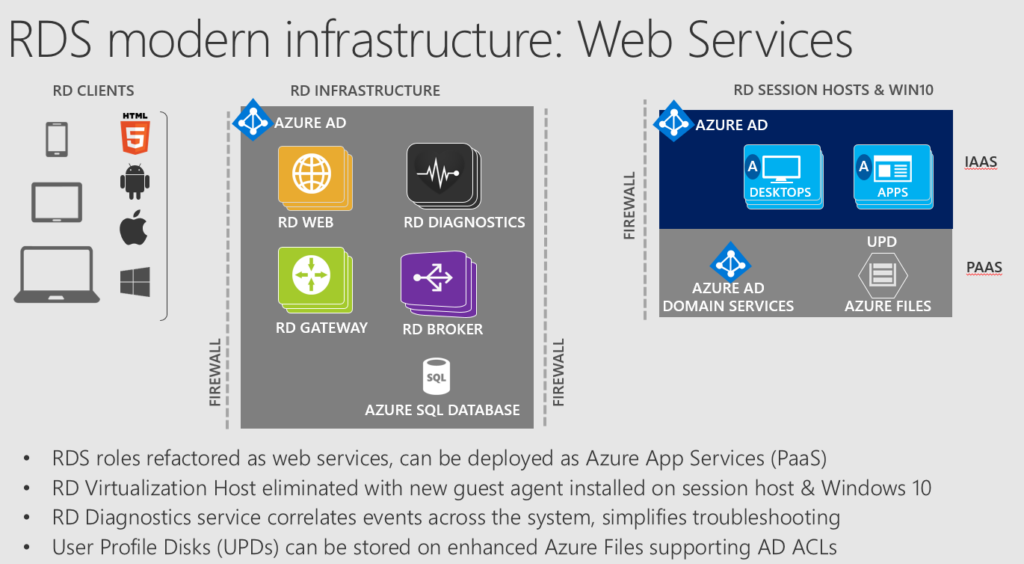
The Windows Server 2019 RDS multi-session features allow multiple users to connect to a single server instance and run independent sessions simultaneously.
This feature maximizes server resource usage while maintaining user isolation for security and privacy.
Understanding how multi-session works helps organizations deploy scalable and cost-efficient remote desktop environments.
How Windows Server 2019 RDS multi-session features Work
Multi-session uses session virtualization to create isolated desktop environments for each user on the same physical server.
Each user gets their own desktop interface and application access without interfering with others.
The server allocates CPU, memory, and storage resources dynamically based on session requirements.
This balancing ensures smooth performance and avoids bottlenecks, even when many users connect concurrently.
Additionally, Windows Server 2019 supports GPU virtualization, improving performance for graphics-intensive applications across sessions.
The result is a flexible and productive user experience that behaves like a dedicated desktop but is hosted on shared infrastructure.
Licensing Requirements for Multi-Session Access
To comply with Microsoft policies, every user connecting to Windows Server 2019 multi-session environments must have a valid Remote Desktop User Client Access License (CAL).
These User CALs authorize individual users to access the remote desktop services legally.
Without the appropriate User CALs, organizations risk non-compliance and potential penalties.
Remote Desktop User CALs can be assigned to named users, granting them access across multiple devices.
This licensing model aligns with the multi-session feature, making it affordable and practical for businesses with many remote users.
Ensuring proper licensing safeguards companies while unlocking the full potential of the multi-session capabilities.
Choosing the Right Windows Remote Desktop User CAL License
Selecting the right Windows Remote Desktop User CAL license depends on the size and needs of your organization and user behaviors.
Understanding the types of licenses and their benefits helps in making cost-effective and compliant decisions.
Types of Remote Desktop User CALs Available
Windows provides User CALs and Device CALs — User CALs permit one user to access the server from any device.
Device CALs grant access rights to one device, regardless of how many users use it, which suits shared workstations.
User CALs are ideal when employees access the server from multiple devices like laptops, tablets, and smartphones.
These licenses also accommodate remote workers and mobile staff effectively.
Choosing User CALs aligns well with Windows Server 2019 multi-session use cases, where flexibility and mobility matter.
Comparing Licensing Alternatives and Costs
Organizations can purchase licenses through volume licensing, retail, or trusted resellers like Fastsoftwares.
Volume licensing suits large enterprises needing many CALs with added benefits such as Software Assurance.
Purchasing from Fastsoftwares offers competitive pricing, authentic licenses, and dedicated support.
This helps organizations minimize costs while ensuring access to genuine CALs, avoiding legal or functional risks.
Comparing these alternatives ensures businesses find the best value while meeting their remote desktop access demands.
Fastsoftwares stands out by providing verified Windows Remote Desktop User CAL licenses efficiently.
Conclusion
Windows Server 2019 RDS multi-session features empower organizations to deliver secure, scalable, and efficient remote desktop services to multiple users.
Understanding how multi-session operates and the necessity of proper Remote Desktop User CAL licensing is vital for compliance and optimal performance.
Choosing the right User CAL license based on your organizational needs ensures cost-effectiveness and flexibility.
For companies ready to enable full multi-session capabilities, purchasing Remote Desktop User CAL licenses from trusted providers like Fastsoftwares is a smart step.
Purchase your Windows Server 2019 Remote Desktop User CAL License today from Fastsoftwares to unlock full multi-session support features.