???? From Selfies to Soundtracks: My Honest Review of MusicCreator AI
First Impressions: Not Your Average AI Tool
Scrolling through endless AI platforms, most look the same complicated dashboards, endless buttons, and zero personality. Then I stumbled on MusicCreator AI. The vibe? Fresh, fun, and ridiculously easy to get started with. It’s not just another “AI music generator.” It actually feels like a tool built for today’s creators people who want to make content on the go, not spend hours buried in software.
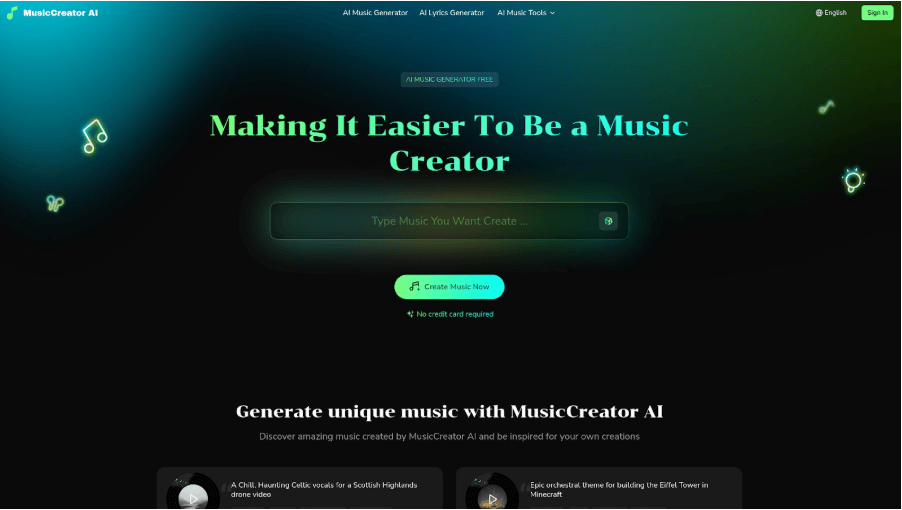
The moment I landed on the homepage, I noticed how intuitive the interface was. No clutter, no confusing menus, just a clear flow that guides you through creating music. The platform immediately feels welcoming. You can tell the developers thought about people who may not even know how to read sheet music, let alone produce a track from scratch. That’s a rare kind of accessibility in the AI space.
What’s the Buzz About?
At its core, MusicCreator AI lets you turn ideas into full-blown tracks in seconds. You can feed it lyrics, moods, or even visuals. Yep—you read that right. Upload a picture, and boom, the Photo to Music feature whips up a soundtrack that feels like it was designed for your aesthetic. For a generation that lives online, that’s kind of genius.
Beyond photos, it can also work from text prompts. Want a chill morning track with soft piano and ambient rain sounds? Type it in, hit generate, and it’s done. The AI even adapts based on your mood descriptions, making it surprisingly smart for a quick creative session.
Features That Got My Attention ????
-
Instant songs: Drop in some words, and it handles the melodies automatically. No musical experience required.
-
Mood playlists: Whether you want something dreamy, hype, or nostalgic, it adapts.
-
Visual prompts: The photo to music tool is addictive. A sunset selfie suddenly becomes a chill lo-fi beat.
-
Polished sound: No crackly, half-baked output. The mastering is clean, so tracks feel professional.
It’s basically music production minus the headache. The way it handles instrumentation is impressive, too. Drums, bass, synths, and even orchestral elements can all be blended seamlessly with a few clicks. For someone who’s dabbled in music software, this speed is nothing short of magical.
How I Actually Used It
Instead of starting with a blank screen, I tested it with one of my travel pics. I uploaded a shot of a rainy Tokyo street, hit the photo to music option, and the result? A moody, cinematic soundtrack that felt straight out of a cyberpunk film. That track is now sitting behind a reel I posted, and people legit asked me where I got the music. Little did they know, I made it in under two minutes.
Then I experimented with a text prompt for a morning coffee vibe. I typed “soft acoustic guitar, warm and cozy, 7 AM sunrise energy” and instantly got a track that could easily be background music for a lifestyle vlog. The AI nails genre, tone, and mood surprisingly well.
The Good Stuff ????
-
Fast AF: Songs generate in seconds.
-
No gatekeeping: You don’t need to know music theory.
-
Content-ready: Every track is royalty-free, so no takedown nightmares.
-
Flexible: Works for TikTok edits, podcasts, ads, YouTube videos—you name it.
-
Constant inspiration: The tool encourages experimentation. You end up creating more just because it’s fun and easy.
It’s the type of tool you keep open in your tabs because you never know when inspiration will hit. It’s not just functional; it sparks creativity in ways that traditional DAWs rarely do.
The Meh Moments ????
Okay, let’s keep it real. Sometimes the photo to music results don’t 100% match the vibe you expected. It’s not like the AI is reading your mind—it’s interpreting mood. That can lead to some tracks feeling slightly off from what you envisioned.
Also, if you’re a pro producer who wants full control over every note, this won’t replace your DAW. There’s no fine-tuning for complex compositions. But for fast, fresh, and fun music? It nails it.
Final Scroll-Stopper Thought
MusicCreator AI isn’t just another AI toy it’s a legit tool that matches the speed and creativity of social media life. Whether you’re chasing vibes for your next reel, podcast, or ad, or just want to turn a selfie into a song, it’s got you covered.
The best part? It makes you feel like a creator, not just a consumer. You’re not stuck clicking buttons or learning complex interfaces. You upload, type, generate, and share all within minutes. For content creators, marketers, or anyone who loves music, it’s a game-changer.
If you’re curious about experimenting with AI-driven music, MusicCreator AI is worth a try. It takes your snapshots, thoughts, and moods and turns them into something you can actually use in your projects. That’s not just convenient, it’s empowering.